Most companies don’t realize that ERP-CRM integration projects can be implemented without changing a single line of code in your programs.
Your company definitely has the capacity to implement a full integration; you just might not know it yet. In our experience, it only takes 3-8 man-days to implement a Salesforce-Microsoft Dynamics integration. It’s much easier to implement than most people think.
Do you know what actually slows a CRM-ERP integration down the most?
It’s not being able to decide what data to integrate!
Therefore, in this article, we have compiled a list of the most common CRM-ERP integrations to help you gain a better grasp of the possibilities.
About Rapidi
With over 30 years of experience integrating data across enterprise systems, we’ve been around since before Salesforce even existed! Our clients synchronize data between their CRM and ERP systems with our no-code platform. As a result, they’ve increased CRM adoption across their sales team and found new business opportunities that they were previously unaware of.
What is CRM-ERP integration?
CRM and ERP integration is the practice of synchronizing data between your customer relationship management system and your enterprise resource planning system.
The goal of this synchronization is to take advantage of:
- Having data from your sales team communicated immediately to your back office (finance teams, shipping teams, etc.)
- Having data from your back office communicated immediately to your sales team. (like invoices, etc.)
From a conceptual point of view, integration makes a lot of sense too: ERP systems provide much-needed internal information that can be shared with new stakeholders. CRM systems provide the entry point for stakeholders to engage with an organization. You can't really have one without the other and be successful in the marketplace.
To learn more about it, check our detailed CRM-ERP integration guide.
Why do you need CRM and ERP integration?
After integrating dozens of ERP and CRM systems for major enterprises, we have found that these companies didn't take full advantage of these systems until they integrated the two.
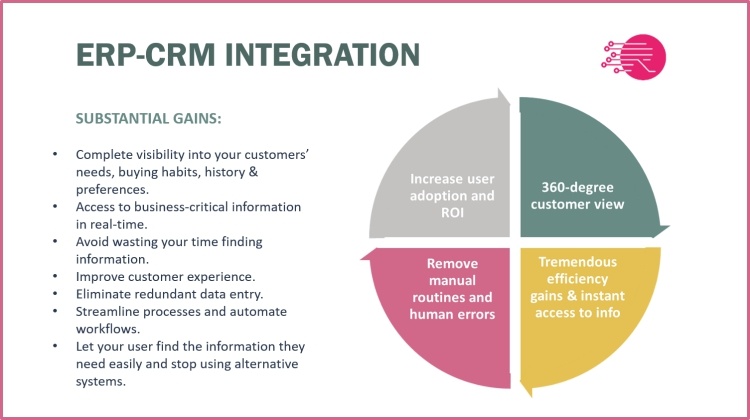
Advantages of integrating CRM and ERP systems
While your CRM helps you:
- Streamline customer-facing processes
- Organize customer data for a better customer understanding
- Cross-sell and up-sell
- Boost sales productivity
- Offer better customer service
- Strongly enhance customer relationship management throughout the sales cycle and even beyond
Your ERP will help you:
- Increase operational efficiency, from supply chain management to billing and accounting
- Gain visibility into all operational aspects of their activity
- Reduce operating costs
- Collect critical information and make better-informed business decisions
- Safely and easily scale
Separately, each solution can potentially make a significant difference in a company’s operations. They collect invaluable information to feed business intelligence systems.
To give you a better idea of the power behind syncing these two systems, let's explore some of the benefits our clients have seen after CRM to ERP integration.
1. Promote CRM Adoption
Ole Lynggaard Copenhagen produces high-end jewelry for the European market.
Before coming to us, they had trouble convincing their sales team to use their Microsoft Dynamics CRM. Therefore, they switched to Salesforce in hopes of getting a better experience for their sales team.
Ole Lyngaard’s executives recognized that if they wanted to incentivize their teams to use Salesforce, they would need to start by integrating with Rapidi.
Once the sales team saw the ERP data inside the CRM system, they were immediately convinced of its value. That increased visibility is a big part of how Salesforce makes its jobs easier.
It was fantastic to observe the sales reps adopting the system almost instantly. The fact that known data was in the system made the training a big success.
Hans Kurt Hansen, CFO & CIO at Ole Lynggaard Copenhagen
Read the case study
2. Reduce manual work
Organizations that don’t use integration are forced to manually enter data into one system to transfer it into the other. Once you integrate your ERP and CRM, that data shows up automatically. As Karla Sinclair, Operational Chief Manager at Homespice Decor said, "With Rapidi we are saving a half full-time employee a week, because we can get to the information right away.”
3. Improved your decision-making capabilities
Real-time data gives you real-time visibility. Being able to see all your invoice or sales data in one place allows you to make better decisions when it comes to upselling clients and predicting payment patterns. As ReadSoft’s IT project manager said: “Thanks to Rapidi our Management can now get a better overview of all the subsidiaries.”
Rapidi is the missing link for us to be able to improve our internal processes and grow our business
Jani Kettula, IT Project Manager at ReadSoft AB, Sweden
Read the case study
4. Get a 360-degree view of every customer
Your sales team spends a lot of time chasing information from your back office. As I alluded to earlier, giving your team all that data can be advantageous in getting them to adopt Salesforce.
ZSK Embroidery was a company that needed more visibility. After implementing Rapidi to sync Salesforce with their Microsoft Dynamics ERP, their sales team was now able to understand where an invoice was produced, where it was paid, the customer balance, and so on.
5. Better Customer Service
As Sarah Delaunay of CF Group indicated after working with us, better data “is not just better sales, but also better service.” Having better data on your customers’ order history will empower your sales team to address any gaps. Plus, the increase in data accuracy and integrity will help you avoid errors that could harm your reputation.
How to integrate your CRM and your ERP: 9 Types of CRM-ERP Integration
Remember how we said that the main challenge of data integration is selecting what data to integrate?
With Rapidi, our data integration platform makes the actual integration part a matter of clicking a few buttons to run and maintain the system. We spend most of the implementation time helping our clients select the right data to transfer between systems and ensuring that it is of good quality.
So, if you ask us, “How to integrate your CRM and ERP?” Our answer would be to think about what types of integrations you need first:
The most common ERP‑CRM integrations that we see in 90% of our projects include account-to-customer, contact-to-contact, product-to-item, item price-to-product price, quote-to-order, sales order-to-sales order, sales history, payments, and service/case management. These integrations ensure data consistency and give teams real-time insights across sales, finance, and operations.
Let's go through those common integrations below.
1. Account-to-customer integration
One of the most common starting points for a CRM-ERP integration is improving the quote-to-sales-order process. Before an order can be created, customer data needs to be available in the ERP because the order is tied to the customer record.
In many cases, the customer record begins in the CRM as a lead and is then transferred to the ERP. But this process is not always one-way. Customer integration is often bi-directional, allowing both sales and finance teams to maintain accurate customer information in the system they use most. This helps reduce manual work and avoids confusion over which team is responsible for updating customer records.
2. Contact-to-contact Integration
Contact-to-contact integration is often included in the discussion, but in many ERP systems only a primary finance contact is truly required. There can still be valid reasons to sync contact data, but in practice this integration is often more limited than companies initially expect.
Another factor is data quality. Contact data is usually one of the hardest types of master data to keep accurate over time, since people change roles, employers, and even names. As a general rule, it is best not to transfer data you do not trust.
3. Product-to-item integration
If you want to create quotes in your CRM, product information needs to be available there. And if you want to support a quote-to-sales-order process, that data also needs to stay consistent across both the CRM and ERP systems.
Product-to-item integration is a good example of how differences in system terminology can complicate field mapping. Labels often vary from one platform to another, so setting up the integration correctly requires a clear understanding of both systems. In most cases, though, integrating products and items is relatively straightforward, and the sync can be one-way or bi-directional depending on how your business manages new item creation.
💡Pro tip: Generally, you are better off if you can avoid creating redundant data between systems manually. It’s much easier to create new records (for example, items) via the integration because this way the link between the two records is created from the beginning, and no additional work is needed to establish that.
4. Item price-to-product price integration
CRM and ERP systems have different pricing and discounting models, and at first glance, they do not seem so easy to integrate. However, it is doable, and once you have a method, you can replicate and reuse it for future integrations. For example, we have been doing a lot of Salesforce – Microsoft Dynamics integrations where the Dynamics pricing and discount models have been converted into price books, in many cases also including the currency dimension.
In the past, the main thing that prevented me from creating quotes directly in CRM was the lack of items and pricing information, and a lack of understanding that (in most cases) it is quite easy to create these transfers - the value of having this as part of your integration setup is tremendous.
5. Quote-to-order integration
When CRM systems first started gaining traction in the late 1990s, one of the main goals was to automate the quote-to-order process. In many cases, though, the practical workaround was simpler: create the quote in the ERP system, enter the totals manually in the CRM, and once the deal moved forward, convert the quote into a sales order in the ERP while updating the opportunity in the CRM to closed won.
Even today, many companies still work this way. It is not a fully integrated process, but it can be a practical and flexible model depending on the business setup.
One drawback is that the CRM does not contain the operational detail salespeople need, so they end up switching between systems throughout the day just to move the sales process forward. That is inefficient and makes it harder to work from a complete customer view. It also limits reporting, because you cannot easily analyze data such as product sales alongside sales activities in one place.
Traditionally, companies have addressed this gap by building a separate data warehouse and loading data from both the CRM and ERP into it. Data integration will not remove the need for a data warehouse in every case, but it can reduce that need significantly. In many situations, it enables you to create the reports you need directly in the CRM, using current data and at a lower cost.
What is most appreciated is the fact that, eventually, the effect of a robust integration is that it encourages organization-wide adoption of the CRM system. Your salespeople will never need to enter the ERP system. This transforms the perception of a CRM system from being a supporting tool to being the sales operating system. This results in efficiency gains, and you don't have to buy the sales user license for both systems.

For more complex or managed sales processes, it’s common to have an add-on solution. This could, for instance, be a product configurator or a guided selling tool. They exist for ERP and CRM systems. My advice is to keep a strict process around this so you only perform product configuration in one system, because it will be very difficult to replicate the exact system's behavior and algorithms.
You may also have a product configurator in the ERP and a simpler guided selling tool in the CRM, such as Salesforce CPQ. In that setup, there are typically two ways to handle ERP sales order integration: either the CRM sales app updates a standard quote on the opportunity, or the integration is moved from the quote module to the other sales module. Both approaches can work well, and the right choice depends on your business process and reporting needs.
6. Sales order-to-sales order Integration
This integration is sometimes scoped later in a project, but it is usually worth including. After a quote is converted from the CRM into a sales order in the ERP, the sales order should also be synced back to the CRM so sales teams have a complete view of the account or opportunity.
Sales order-to-sales order integration should also keep the CRM updated when the order changes. That may include customer-requested revisions, partial deliveries, partial invoicing, or product substitutions. Keeping those updates synchronized helps maintain accurate reporting and a reliable picture of the customer relationship.
It is also important to note that some embedded Microsoft integrations, including Microsoft Dynamics 365 Business Central and Sales, do not support this level of synchronization and can therefore be limiting. Depending on your business process, the sync can be one-way or bi-directional.
7. Sales history integration (invoices and credit memos)
Sales history is almost always included in an ERP-CRM integration because it gives sales, finance, and service teams valuable context. In CRM systems such as Salesforce, historical invoice data can also improve forecasting, reporting, and customer follow-up. For day-to-day customer interactions, having access to sales history is essential.
Sales history is typically transferred by syncing posted invoices from the ERP to the CRM. To create a complete picture, it usually also makes sense to include credit memos. Because an invoice in most ERP systems consists of both a header and line items, transferring sales history means syncing multiple related tables. In most cases, it is worth transferring the full detail, since the added effort is minimal and the reporting value is much higher.
To get more value from your sales history, connect it to the related CRM records. The customer should be linked to the account, and each invoice line item should be linked to the corresponding product or item record. This gives your team better reporting, deeper drill-down analysis, and a clearer view of customer activity.
You can also create roll-up summary fields in CRM based on sales history data, so key metrics such as total sales for the fiscal year are visible without running a separate report. Add the summaries you need, and your sales history dashboard is always within reach.
8. Payments
To complete the quote-to-cash process, it also makes sense to transfer payment data, typically through ledger entries. This gives your team visibility into payment behavior, overdue amounts, and other financial details that are often difficult to access directly from an opportunity or account in the CRM.
In addition to helping sales teams better understand the customer relationship, payment data can support cash collection efforts and provide useful context during negotiations for future deals.
Payments can be linked to the exact invoice/Opportunity/account, etc. in CRM, which activates the use of payment information and source statistic reports.
Read also: From lead to invoice - How ERP-CRM integration streamlines processes
9. Other integrations
There are many other integration possibilities beyond the ones listed here, especially in service and case management, where the same core integration principles still apply.
Data integration can involve many moving parts, but the real value comes from making that complexity easy for users to manage. That is why many companies move away from rigid custom integrations and choose flexible, ready-to-use platforms such as Rapidi that are easier to set up, maintain, and adapt over time.
See quote-to-cash sync in action
Watch this 8-minute demo showing how Rapidi keeps customer master data, sales orders, invoices, and payments in sync between Microsoft Dynamics 365 Business Central and Salesforce, right at the account level.
Integrate your CRM and ERP with Rapidi
Do you want to get the most out of your ERP and CRM systems? Integrate them.
Today, cost-effective cloud-based solutions such as Rapidi Data Integration Solution make fast, automated, and secure data integration much more accessible. Because these solutions run as a service, implementation is often completed in just 3-10 man-days, making it practical and affordable to move forward with integration.
In many cases, the greater risk is not integrating at all. When CRM and ERP systems remain disconnected, companies miss the full value of both systems and limit the return on their investment.
With Rapidi Data Integration Solution, you get integrations 1-7 as out-of-the-box, customizable solutions that can typically be implemented in 8-14 man-days, depending on scope and any additional transfers or customizations. If you would like to explore what that could look like for your business, feel free to get in touch.
I was astonished with what could be done with the Rapidi interface. I never believed it could be this powerful. I never want to work without Rapidi again.
Never! Never! Never!
Florian Nicolai, IT Consultant for ZSK
Updated July 2026